
Resources
Help & articles
Guides, how-tos and news for your catering business.
Help topics
Quotes & Orders
Order Versioning
Save changes to an accepted order in place, or create a new version that the customer has to re-accept.
Save changes to an accepted order in place, or create a new version that the customer must re-accept.
When the Buttons Appear
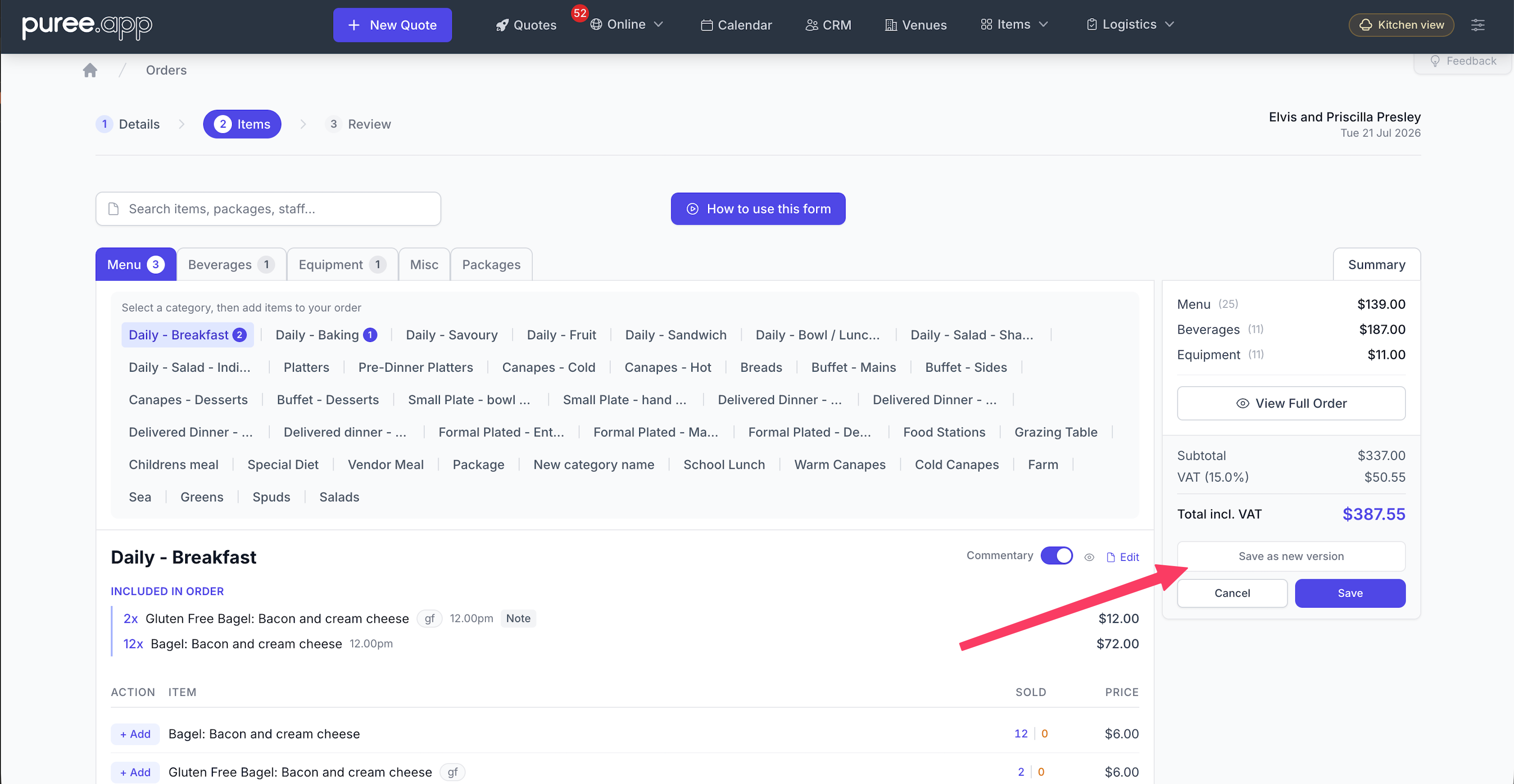
Open an order and click Edit. At the bottom of the order form, the Save button area shows two options once the order is in Accepted state:
-
Save — keeps the order at its current version (e.g.
123stays123) and the order remains Accepted. -
Save as new version — sits just above the Save button. Bumps the version (e.g.
123becomes123.2) and reverts the order to Pending.
The Save as new version button is only visible on orders that have already been accepted. For orders in Draft or Pending state, only the standard Save button is shown.
When to Use Each Option
Use Save as new version for material changes the customer should re-approve before the event proceeds:
- Guest count changes that affect pricing
- Adding or removing menu items
- Changes to the event date, time, or venue
- Updates to packages, staffing, or significant fees
A new version reverts the order to Pending, so the customer needs to accept it again. Don’t use this for tiny edits — you’ll create unnecessary re-acceptance work.
Use the standard Save for minor internal edits — fixing a chef instruction, attaching a document, updating a tag, correcting a note. The order keeps its current version and stays Accepted. The customer doesn’t need to do anything.
Viewing Past Versions
When an order has been versioned, a Previous Versions dropdown appears at the bottom of the order show page. The dropdown lists the current version plus every prior version (e.g. Quote # 123.1, Quote # 123.2).
Click any entry to view the order exactly as it was at that version. To return to the current version, click the entry marked (current) in the dropdown.
Saving in place does not create a separate snapshot — only changes that bump the version number are kept as history.
What’s Preserved per Version
The historical snapshot reflects the quote contents at that version, including:
- Order items, including quantities, prices, menu headers, and notes
- Staff lines (positions, hourly rate, start/finish times)
- Deliveries and venue reservations
- Packages (including any package selections such as All Items)
- All commentary fields (introduction, event format, menu, beverages, equipment, miscellaneous, staff, venue)
- Discount or surcharge configuration
- Deposit required (amount, type, percentage, full-payment-in-advance flag)
- External supplier details, online order information, and scheduled payment requests
What’s Not Versioned
Some data isn’t tied to the quote and stays current regardless of which version you’re viewing:
- Deposits received — these are operational records of money paid, not part of the quote
- Tags, attached documents, and notes — admin metadata that lives at the order level
- Audit trail and chef/driver instructions — operational notes
For these, you’ll always see the current values even when viewing a previous version of the quote.
Keeping a Permanent Copy
For an external record outside Puree — accounting, legal, or a long-term archive — download the quote as a PDF before saving a new version. Open the order, click Download PDF, and save the file to the customer’s documents, your shared drive, or your accounting system.
This is recommended for high-value events, weddings, and corporate jobs where there’s any chance of a dispute about what was agreed at each stage.
Quick Reference
- Save as new version only appears on Accepted orders.
- New versions bump the order number (
123 → 123.2) and revert the state to Pending for re-acceptance. - Use new versions for material changes; use Save for minor internal edits.
- Past versions are viewable from the Previous Versions dropdown on the order show page.
- Versioned data: items, staff, deliveries, venue reservations, packages, commentary, discount, deposit requirements, suppliers, online order info, scheduled payments.
- Always-current (not versioned): deposits received, tags, attached documents, notes, audit trail.
- Download the PDF before bumping the version if you need an external long-term record.