
Resources
Help & articles
Guides, how-tos and news for your catering business.
Help topics
Settings
Commentary Templates
Create reusable text blocks you can drop into quotes to save time and keep your wording consistent.
Create reusable text blocks that can be quickly inserted into your quotes to save time and maintain consistency.
What Are Commentary Templates?
Commentary templates are pre-written text blocks that you can insert into different sections of your quotes. Instead of typing out descriptions from scratch each time, you select from a library of templates you’ve created. This saves time, ensures consistent messaging, and gives your quotes a professional, polished feel.
Finding Commentary Templates
Open the settings menu from the icon in the top-right corner of any page, then choose Commentary templates under Quotes & menus.

The Templates Page
Templates are grouped by where they appear. The Categories sidebar down the left lists every group with a count of how many templates it holds; click one to see its templates on the right.
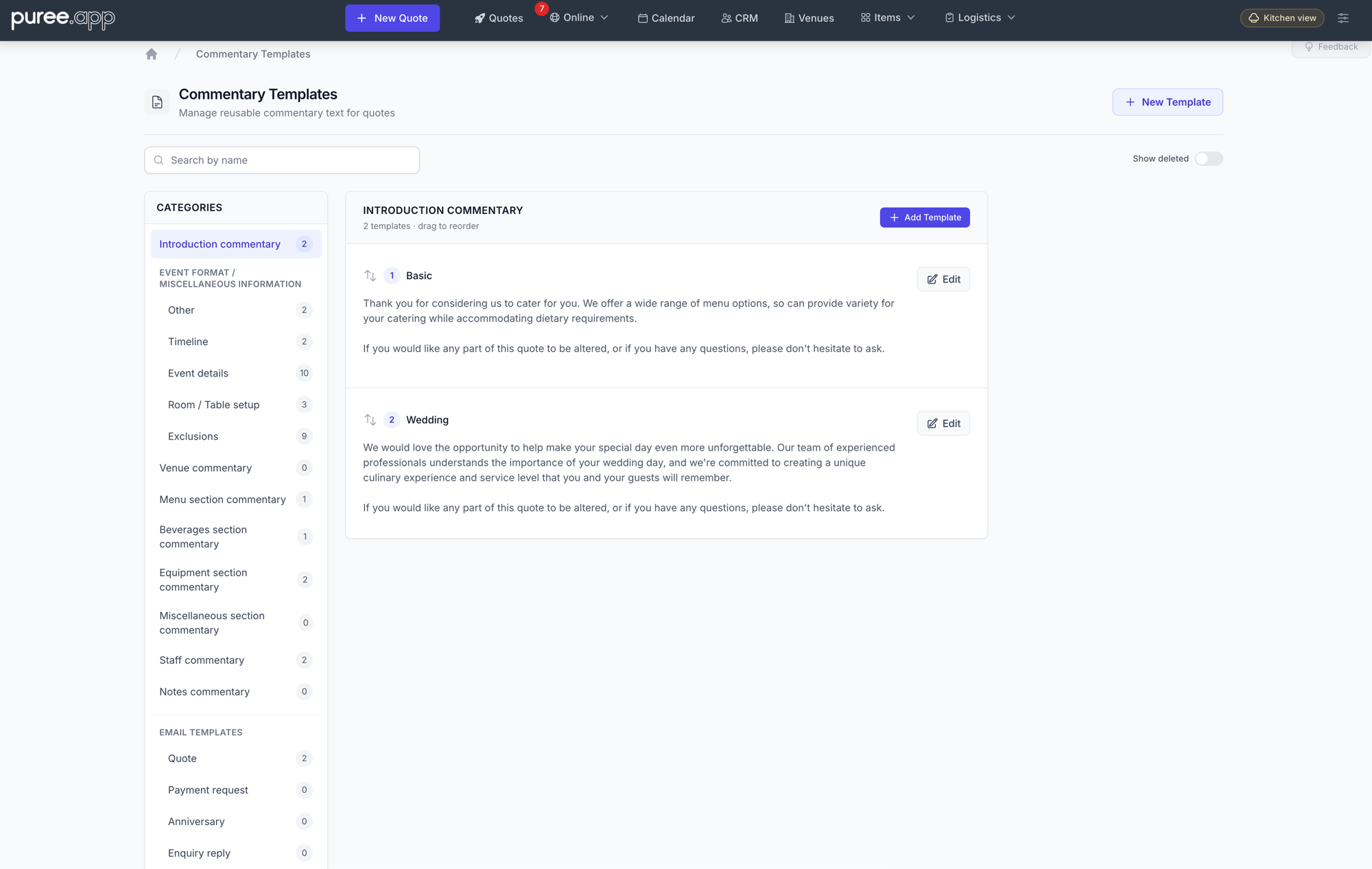
From here you can also:
- Search by name — find a template without hunting through categories
- Add a template — New Template at the top right, or Add Template to create one directly in the category you’re viewing
- Reorder — drag templates within a category to set the order they’re offered in
- Edit — open any template to change its name or content
- Show deleted — toggle on to see templates you’ve deleted, so they can be restored
Template Types
Every template belongs to a category. Most are sections of the quote itself:
- Introduction commentary — Opening text that sets the tone for the quote
- Event format / miscellaneous information — A group covering the event’s shape. Other holds free commentary, and alongside it sit Timeline, Event details, Minimum guests, Room / Table setup and Exclusions, each with its own page
- Venue commentary — Notes about the venue
- Menu section commentary — Commentary about the menu offering
- Beverages section commentary — Details about beverage service
- Equipment section commentary — Information about equipment included
- Miscellaneous section commentary — Any additional commentary
- Staff commentary — Notes about staffing arrangements
- Notes and tasks — Wording you reuse on notes, and on tasks written against a quote
The rest are email templates — letters you send rather than sections of a quote — grouped under their own heading at the bottom of the sidebar: Quote, Payment request, Anniversary, Enquiry reply and Opportunity. These support placeholders that are filled in with the customer’s details when you load one into a composer.
Terms and conditions are managed separately — see Terms & Conditions.
Creating Templates
Click New Template, or Add Template inside a category. Choose the category, give it a descriptive name, and write the content in the rich text editor. You can create as many templates as you need in each category, apart from Minimum guests, which holds just one.
Your account comes preloaded with a default set of templates to help you get started. These can be used as-is, edited to suit your business, or deleted if they’re not relevant.
Minimum Guests Wording
The Minimum guests category holds a single template: the wording shown on a quote under its minimum guest count (see Event Format & Miscellaneous Information). Every account starts with standard wording:
This quote is based on the minimum number of guests above. If your guest numbers fall below this minimum after you accept the quote, the price per guest may change, or we may charge for the minimum number of guests.
Edit it to match your own terms. To go back to the standard wording, open the template and click Revert to default. As there’s only one, this category has no Add button, and quotes use it without asking you to pick.
Quotes keep the wording they were given when their minimum was first entered, so editing this template won’t change quotes you’ve already sent.
Using Templates in Quotes
When creating or editing a quote, each commentary section has a template selector. Click it to choose from your saved templates for that section. The template text is inserted into the quote and can be further edited for the specific event if needed — changes you make on the quote don’t affect the original template.
Managing Templates from an AI App or the API
A connected AI app, or your own script using the developer API, can look up your templates and, if you allow it, add and edit them, change their order, and archive or restore them. This needs the Commentary and email templates area on your API and AI access. See Connecting with an AI Agent and The Developer API.
- Placeholders such as
{customer_name}are kept exactly as written, and filled in when you load the template into an email. - Files attached to an email template can be seen but not added or removed this way. Manage those here.
- Terms and conditions can’t be changed this way, because each change is saved as a new version. Manage them in Terms & Conditions.
Tips
- Create multiple templates per section for different event types (e.g. a corporate menu description vs. a wedding menu description)
- Use descriptive names so it’s easy to pick the right template when building a quote
- Invest time in crafting your templates well — it pays off every time you create a new quote
- Review and update templates periodically to keep them current with your offerings