
Per-Group Commentary: Add Descriptions Under Menu Headers and Categories in Your Quotes
By Andrew Hemphill · 12 July 2026
Puree already lets you add commentary to a whole section of a quote — an introduction, or a note above your menu. Now you can go one level deeper: add a block of text under any individual menu header or item category, sitting between that group’s heading and its items. It’s the perfect place for a short description of a course, an explanation of how a grazing table works, or a note about what’s included in a particular category.
A Third Level of Commentary
Quotes now support commentary at three levels, each nested inside the one above:
- Section commentary — text for a whole section, such as the Menu, Beverages, Equipment or Miscellaneous section
- Per-group commentary (new) — text under a specific menu header or item category within that section
- Item detail — the description on each individual item
Per-group commentary works across the Menu, Beverages, Equipment and Miscellaneous sections, and for both menu headers and item categories — so wherever a group heading appears on your quote, you can add a description beneath it.
Important: Per-group commentary is customer-facing and appears on quotes only — in both the online and PDF quote, and across every styled quote template. It does not appear on any docket (chef, consolidated, driver, beverage, equipment or event brief), report or menu. It’s for describing your offering to the customer, not for kitchen or delivery instructions.
Per-Quote Text, With Account-Wide Defaults
Each quote can carry its own commentary for a group, so you can tailor the wording to a specific event. But because most groups say the same thing most of the time, you can also set an account-wide default on the menu header or category itself. That default automatically seeds every new quote that uses the group — so your standard description is there without retyping, and you’re free to tweak it for the event in front of you.
Editing a quote’s commentary never touches the default. And if you clear a quote’s commentary (submit it blank), the group simply falls back to the account-wide default again.
Setting a Default
Open a menu header or an item category from your settings and you’ll find a default commentary field. Whatever you write there becomes the starting text for that group on every quote. Leave it blank if you’d rather add commentary quote-by-quote.
Editing on a Quote
Inside a quote, click the commentary text (or the pencil icon) beneath a group heading to edit it inline. The editor opens seeded with the group’s default, ready for you to adjust. Save to keep a per-quote version, or submit it blank to clear your override and drop back to the default.
Customer-facing commentary renders in an understated, italic style in your template’s own theme font, so it reads as a considered description rather than a bolt-on note. And when you duplicate a quote, its per-group commentary comes along with it.
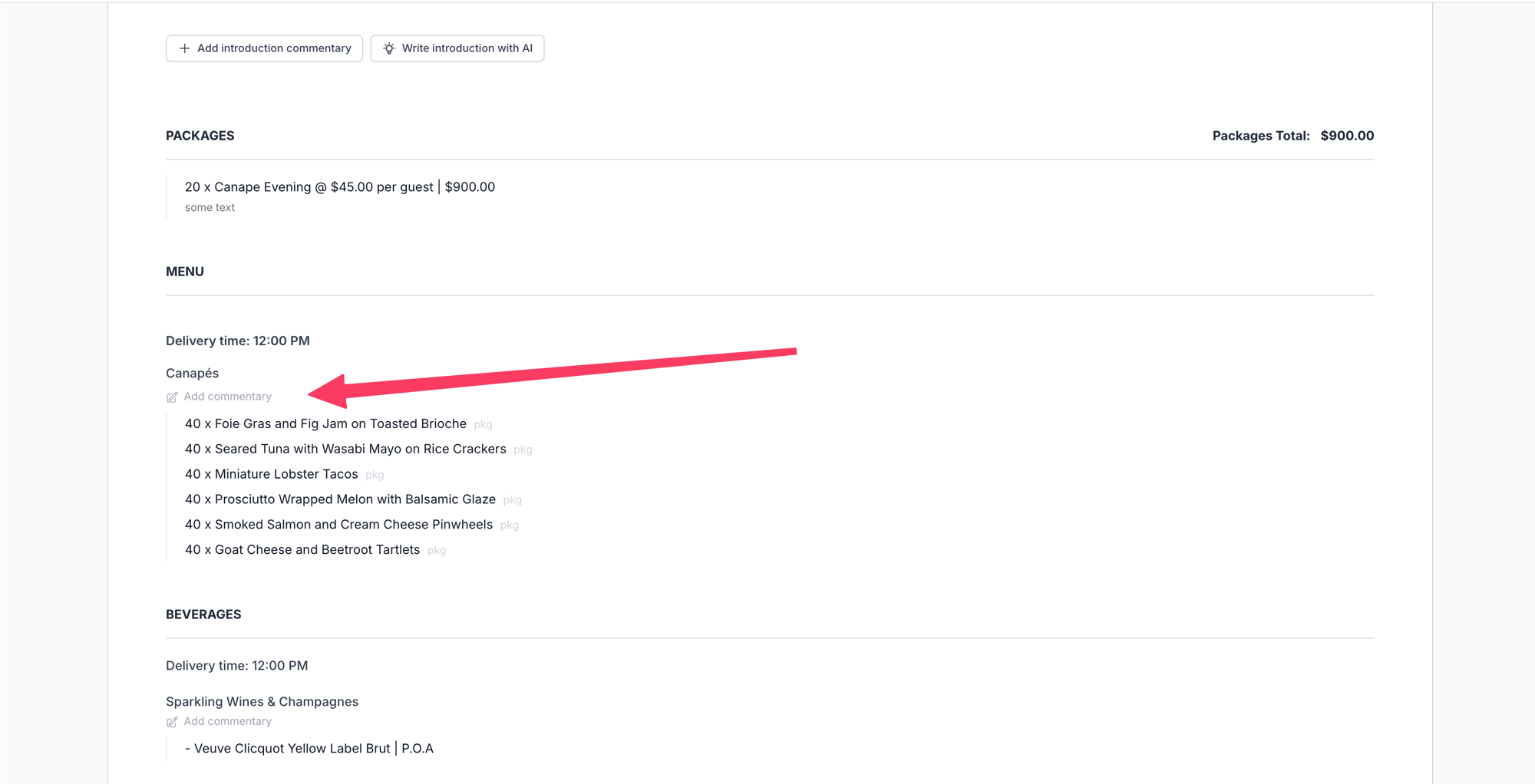
Inside the order, an Add commentary link sits beneath each group heading — click it (or the pencil) to edit inline.
Tip: Set defaults on the headers and categories you use most — a “Grazing Table” header or a “Canapés” category — so every quote starts with a polished description you can lightly tailor per event.
For full instructions, see our Menu & Category Commentary.